Requirements: 5.0+
Overview: MT Manager is a very powerful file manager and apk editor, you can use it to do a lot of things on your device, such as managing files, modifying and translating applications, editing text and so on.
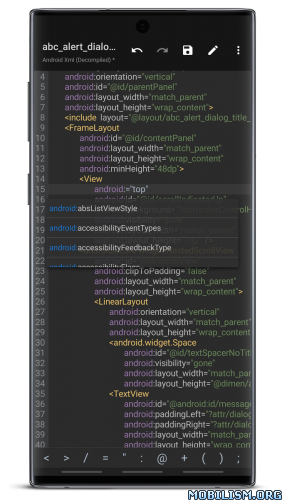
Features:
– FTP client
– Viewing the java code
– Support for keystore and jks signatures [VIP]
– Search History
– Search in XML files
– Search by ID in arsc
– Support for several dictionaries in the translator (UTF-8 without BOM) [VIP]
– Removing and adding localizations
– Fast transfer of unique strings to the desired localization
– Batch operations (delete, copy, move, rename)
– APK/ZIP Signing
– Cloning of APKs [VIP, free for the old method]
– Optimizing APK
– APK Encryption
– Creating a backup (.bak)
– Convenient color change in arsc
– Current Activities List
– Remote access via WiFi
– Decompilation / Compiling XML [VIP] (non-vip is limited to only 200-lines)
– Arsc Editor
– DEX Editor
– Fix DEX files [VIP]
– Text editor with syntax highlighting
– Comparison of text files up to 500 KB [VIP]
– View fonts (.ttf)
– Executing scripts
– Working with RAR (opening / unpacking)
– Work with ZIP (compression / unpacking)
– Multi-choice
– View / edit / delete / add classes, methods, domains, permanent
– Baidu Translator, Yandex and Google [VIP]
Version – TargetSdk28
Due to policy requirements of app store, MT’s targetSdk has been upgraded to 30.
This change will have several impacts:
– Execution permission has been removed from application data directory. This change mainly affects terminal emulator: previously you could put executable file in home directory and then chmod +x to execute it, but now you cannot do this.
– For ROOT devices, if -su command does not support setting mount namespace, then only two folders can be seen after accessing the /data/data directory. This situation is currently known to exist in Meizu’s own ROOT.
– If these changes affect your use, you can download TargetSdk28 version, and above problems will not exist.
– This version can only be downloaded from official website and will not be put on app store. Subsequent updates can be updated from within app or downloaded from official website. Do not update from app store!
Currently, we have received individual feedback that after overwriting the TargetSdk28 version from the TargetSdk30 version, the installation of the terminal extension package fails. This problem can be solved by uninstalling and reinstalling.
What’s New:
– New: Kill signature verification feature, now supports choosing whether to sign processed APK file.
– New: When V1 signing is not enabled in APK signing options, supports selecting “Retain original V1 signature data.”
– New: If an APK contains multiple signing schemes with inconsistent signatures, each scheme’s signature data can be viewed separately.
– Improved: APK signature detection: If signature verification partially fails but does not affect installation on current system, signature status is displayed in yellow.
– New: Dex translation mode now supports opening multiple Dex files simultaneously.
– Arsc translation mode entries now use XML-style markup syntax.
– Improved: Enhanced stability of Dex Editor++ during compilation phase.
– Improved: Text editor search options now allow regular expressions and whole-word matching to be enabled simultaneously.
– New: Text editor syntax files now include preprocessing directives. Please refer to official syntax file development documentation for details.
– New: Text editor now supports customizing menus within top toolbar’s “Edit” group.
– Improved: Translation mode’s multi-selection method has been changed to long-pressing any two items sequentially, standardizing multi-selection logic across interfaces.
– Improved: Algorithm for extracting image time from EXIF information.
– Optimized: Whether display ASCII control characters and Unicode special characters in text input box follows text editor settings.
– Fixed: Issue where canceling a single installation package extraction still displayed a success message.
– Fixed: Issue from previous version where APK installation anti-auto-deletion feature failed on some systems.
– Fixed: Lag issue in file lists under certain directories in night mode.
– Fixed: Issue where MT would still show “Installing” even though APK was successfully installed when using system installer.
– Fixed: Issue where plugin function of previous version was not working on Android 7.1 and below.
– Fixed: Issue where FTP function was incompatible with ProFTPD server in Chinese environments.
– Fixed: Problem with arsc editor+
– Fixed: Problem with viewing some .tga files
– Fixed: Problem with translation mode
Package Info:
- Languages: Full Multi Languages;
- CPUs: armeabi-v7a, arm64-v8a, x86, x86_64
- Screen DPIs: 160dpi, 240dpi, 320dpi, 480dpi, 640dpi;
This app has no advertisements
More Info:
https://mt2.cn
https://t.me/mtmanager
Download Instructions:
https://uploadrar.com/gkwilo733rrf
Mirror:
https://devuploads.com/y2wwz7wcz6wu
Clone:
https://uploadrar.com/1aplkoero64i
Mirror:
https://devuploads.com/t6769ndfi54s
TargetSDK 28:
https://uploadrar.com/2rwyqpuwaznq
Mirror:
https://devuploads.com/rruy0vlo8lz3
TargetSDK 28 Clone:
https://uploadrar.com/fohnuw2ltn2t