Requirements: 5.0+
Overview: A minimalist productivity launcher. One hand-friendly. Zero ads.
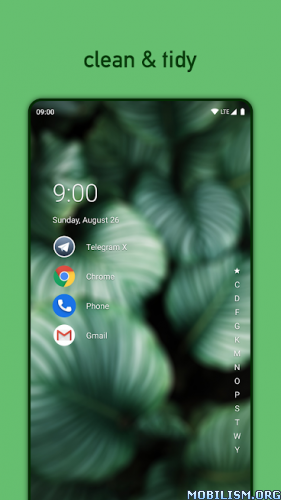
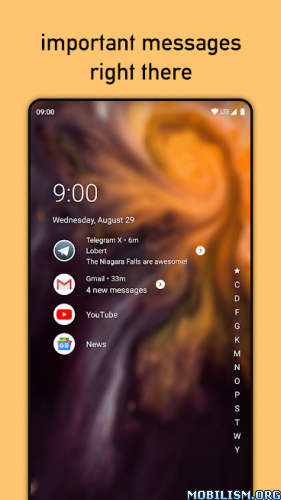
Niagara Launcher gives your phone a whole new look and offers a minimalistic experience to help you to form a healthy relationship with your phone. You also get to experience the latest and greatest features of Android 10, including smart replies and dark mode.
Top reasons to use Niagara Launcher:
All apps in a simplified list · You just need to scroll either of the edges on the launcher to get access to all of your apps instantly.
Interact with notifications right on the home screen · Unlike most other launchers, Niagara Launcher gives you essential information about received messages at a glance and directly on your home screen. Swiping on a notification expands it and lets you reply quickly.
Ergonomic efficiency · Niagara Launcher is optimized for one hand usage. Your apps are always within reach and the scrollbar can be used from both sides.
Lightweight & fast · Niagara Launcher is not only lightweight to your phone’s resources, but at just a few megabytes in size, the app takes up very little space. Next to simplicity, fluidity is one of the most important aspects of Niagara Launcher.
Media Player · Music controls automatically show up on your home screen when they’re needed, too – anytime you’re playing audio from an app.
Theming · Niagara Launcher pulls colors from your wallpaper for a nice thematic effect. Additionally, you can choose between a light or dark theme. Icon packs are supported as well – you can even apply an icon of your choice to each app individually.
Hide unwanted Apps · Hide all pre-installed bloatware, to get a clean and tidy home screen.
❏ Mod info:
◉ Pro Unlocked
◉ Use any other Weather Widget app, Its own weather widget won’t work
★ Modded By RBMods
What’s New:
More suggested category icons when using Icon Assistant
Due to a recent change, Icon Assistant only showed the most fitting category icon for an app.
If multiple categories fit an app (e.g., a card game is also a game), the Icon Assistant now suggests icons for all matching categories (i.e., a deck of cards and a game controller) again.
Updated translations
Even though Christmas is still a few days away, our translators delivered their gifts early in the form of fresh translations. Thank you very much!
If you want to try something new over the holidays, maybe translating Niagara Launcher is something for you?
Signing off for 2025
Unless this update leads to something unexpected, it will likely be the last one of 2025 as we head into the holidays.
While this year was full of big changes for us, such as working on Niagara Launcher full-time and moving to a new office, there’s one thing that didn’t change: the excitement every time we release a new update and nervously wait for your reactions. We can’t wait to feel that even more next year with the things we have planned!
Thank you so much for participating in our community and for making the work on Niagara Launcher so fulfilling. Without you, this whole thing would not be the same.
We wish you happy holidays, and as we like to say in Germany, we hope you slide well into next year..
This app has credit advertisements
More Info:
https://play.google.com/store/apps/details?id=bitpit.launcherDownload Instructions:
https://cloudfam.io/4289cf79b748
Mirrors:
https://devuploads.com/5c1jtsp3t248.