Requirements: 5.0 and up
Overview: MT Manager is a very powerful file manager and apk editor, you can use it to do a lot of things on your device, such as managing files, modifying and translating applications, editing text and so on.
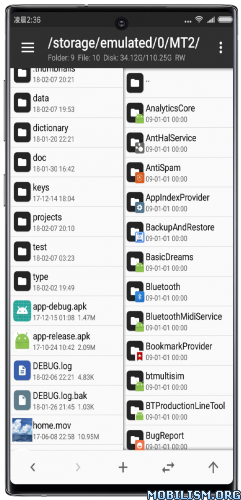
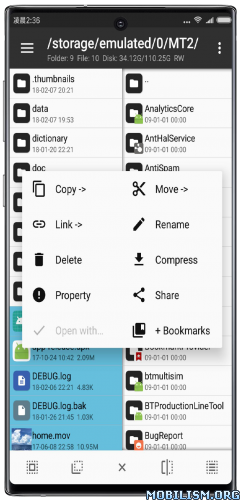
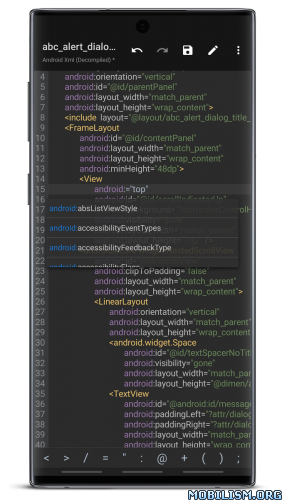
Features:
– FTP client
– Viewing the java code
– Support for keystore and jks signatures [VIP]
– Search History
– Search in XML files
– Search by ID in arsc
– Support for several dictionaries in the translator (UTF-8 without BOM) [VIP]
– Removing and adding localizations
– Fast transfer of unique strings to the desired localization
– Batch operations (delete, copy, move, rename)
– APK/ZIP Signing
– Cloning of APKs
– Optimizing APK
– APK Encryption
– Creating a backup (.bak)
– Convenient color change in arsc
– Current Activities List
– Remote access via WiFi
– Decompilation / Compiling XML [VIP] (non-vip is limited to only 200-lines)
– Arsc Editor
– DEX Editor
– Fix DEX files [VIP]
– Text editor with syntax highlighting
– Comparison of text files up to 500 KB [VIP]
– View fonts (.ttf)
– Executing scripts
– Working with RAR (opening / unpacking)
– Work with ZIP (compression / unpacking)
– Multi-choice
– View / edit / delete / add classes, methods, domains, permanent
– Baidu Translator, Yandex and Google [VIP]
What’s New:
【Enhanced 】7-Zip kernel upgraded from 16.02 to the latest 25.01 version
【Added 】 When renaming a file, if the target file already exists and is not a folder, support the selection of exchange, deletion, backup and other processing methods
【New】 All folders that have been set to independent sorting can be viewed and managed in “Sorting Method – Management”
【Added 】Network storage setting sorting method supports selecting “Apply only to the current folder”
【New】 Video player supports memory playback position (video duration must be greater than 3 minutes)
【Added 】Object storage AWS S3 support configuration whether to use path style access
【Added 】installation package extraction function to support batch uninstall selection applications
【Added 】support for deleting and renaming files with garbled file names
【Optimize 】Regular Expression Engine: Improve the search performance of square bracket expressions
【Optimization 】 greatly improves the search speed of Dex++ search methods/field calls
【Optimize 】text contrastor to display the current difference at the next few points and the total difference number
【Fix 】Fix the problem of invalid preservation when editing entries in translation mode and then changing back to the original text
【Fix 】Fix the problem that the text editor shortcut function cannot be clicked on some systems
【Fixed 】Arsc++ string search results not displaying
【Fixed 】incorrect display of text input box magnifier in dialog box
【Fixed multiple description errors in the 】Smali directive query function
【Fixed 】some TGA images not displaying correctly
【Fixed】 an issue with music players causing flashbacks
V3 plugin in public beta
The MT plugin v3 version has stabilized and is currently in public beta. If you are interested in plugin development, you can visit mt2.cn > Manuals > Plugin Development v3 (opens new window), get more relevant instructions
About version naming
From 2026, MT will adopt “2. Year. Month” as the version number naming rule.
Previously we used “2. Large version number. The format of “small version number”, large version usually represents a major change, and small version is used for problem fixing. However, each update of MT often includes new features and problem fixes at the same time, and may even inevitably introduce new problems, making the distinction between “large/small versions” meaningless and prone to comprehension bias.
Over the past few years, MT has basically maintained a rhythm “one update per month”, so using a time format is more in line with the release pattern and makes it easier for everyone to judge whether it is the latest version at a glance.
Package Info:
● Languages: Full Multi Languages;
● CPUs: armeabi-v7a, arm64-v8a, x86, x86_64
● Screen DPIs: 160dpi, 240dpi, 320dpi, 480dpi, 640dpi;
● Untouched apk with Original Hash Signature, no [Mod] or changes was applied;
● Certificate MD5 digest: 1a32f661095560285c0f7ea0b521cb45
This app has no advertisements
More Info:
https://mt2.cn
https://t.me/mtmanager
Download Instructions:
https://upfiles.com/Zn14bCL
Mirror:
https://frdl.my/6w0it4nui0d5
https://devuploads.com/y8pdg7o9jznv
Clone:
https://upfiles.com/8LZh0
Mirror:
https://frdl.my/rf6bk9e3phao
https://devuploads.com/7kptnprbd4d2
TargetSDK 28:
https://upfiles.com/57VYbml
Mirror:
https://frdl.my/c6kqcwnf2esc
https://devuploads.com/2b0t9265n449
TargetSDK 28 Clone:
https://upfiles.com/EoEppx7W
Mirror:
https://frdl.my/nhjj4mdwkin1
https://devuploads.com/n9l3p9rdhhtv.