Requirements: 7.0+
Overview: Stream all your music, videos and photos to various devices in your house.
Chromecast, Chromecast Audio, Nexus Player, Nvidia Shield and other devices with Chromecast built-in
DLNA TV, Smart TV
music receivers from popular HiFi brands
Xbox 360, Xbox One, Xbox One X, Playstation 3 and 4*
Amazon Fire TV and Fire TV Stick
local Android playback
BubbleUPnP can access your media from a lot of sources, including:
UPnP/DLNA media servers on your local network
local media stored on your Android device
popular cloud media storage providers: Google Drive, Google Photos, Box, Dropbox, OneDrive
music services: TIDAL, Qobuz
media from other apps using Share/Send such as: web browsers, file managers…
…and more!
BubbleUPnP is a versatile app packed with many features for you to discover, some of which are:
‣ extensive Chromecast support: play incompatible Chromecast media with smart transcoding (audio in videos in particular), subtitles with custom appearance, audio/video track selection**
‣ fast and secure Internet access to your home media on the go from mobile and WiFi networks**
‣ playback queue, editable playlists, scrobbling, sleep timer, various shuffle modes
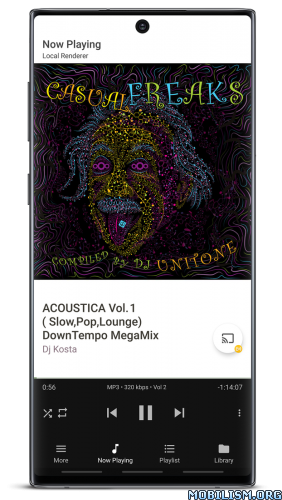
‣ play media to your Android device from other devices (renderer functionality)
‣ DLNA media server functionality for accessing your local and cloud media from other devices
‣ media download to your device
‣ dark and light themes
‣ …and much more!
* Only possible from the PS3 or PS4 interface
** Some features are provided by BubbleUPnP Server, an optional software that can be installed on any machine on your local network to provide additional services. To learn more about BubbleUPnP Server, visit https://bubblesoftapps.com/bubbleupnpserver
Some features are restricted and can be unlocked by purchasing the BubbleUPnP License app.
What’s New:
4.6.3
fixed extraction metadata progress dialog not showing up on devices prior to Android 16
added extraction and display of the GROUPING tag
added Publisher metadata to TIDAL tracks and albums
added BPM metadata to TIDAL tracks
improved metadata extraction speed on SMB shares
fixed ‘Show Metadata’ dialog displaying Comment tag (Desc. field) twice with MinimServer in some cases
fixed sharing tracks and albums from the TIDAL app to BubbleUPnP not working anymore
fixed ‘Play TIDAL track radio’ action not always present in the 3 dot menu of TIDAL tracks in the Library tab for tracks that have a radio
fixed ‘Play TIDAL track radio’ present in the 3 dot menu of TIDAL tracks in the Playlist tab and Now Playing tab when the track has no radio
fixed some Boox e-ink devices having some buttons displayed with black text on a black background
fixed moving (or adding) a track immediately after the playing track in the Playlist tab of a Google Pixel device playing locally with gapless playback enabled, resulting in the moved track being immediately played
fixed mp3 tracks played locally on a Google Pixel device with gapless playback enabled resulting in tracks stopping before the end
added ability to start the app on the ‘Devices’ tab in ‘More > Settings > Control > Startup screen’. Requires ‘Look and Feel > Show Devices tab’ to be enabled
improved e-ink theme
fixed ‘Add SMB Share’ action in the 3 dot menu of a sub-folder of a SMB Share not working properly
fixed album header of an album folder in the Library tab sometimes not displaying album art
fixed a few obscure and rare crashes
a few other minor tweaks
updated some libraries used to build the app
Mod Info:
- Pro / Paid features unlocked;
- Disabled / Removed unwanted Permissions + Receivers + Providers + Services;
- Optimized and zipaligned graphics and cleaned resources for fast load;
- Ads Permissions / Services / Providers removed from AndroidManifest;
- Ads links removed and invokes methods nullified;
- Ads layouts visibility disabled;
- Google Play Store install package check disabled;
- Debug code removed;
- Remove default .source tags name of the corresponding java files;
- Languages: Full Multi Languages;
- CPUs: armeabi-v7a, arm64-v8a, x86, x86_64;
- Screen DPIs: 120dpi, 160dpi, 240dpi, 320dpi, 480dpi, 640dpi;
- Original package signature changed;
- Release by Balatan.
This app has no advertisements
More Info:
https://play.google.com/store/apps/details?id=com.bubblesoft.android.bubbleupnpDownload Instructions:
armeabi-v7a:
https://cloudfam.io/936a8304f2c6
Mirrors:
https://modsfire.com/71Ar52Q475UDoIy
https://frdl.io/bq4u7qenx1z6
https://upfiles.com/UPF2tT
https://mega4upload.net/gglkhdct4f5j
https://katfile.online/18fbriz7tzlw
https://dailyuploads.net/drasfqcds10q
arm64-v8a:
https://cloudfam.io/4d6aed52466b
Mirrors:
https://modsfire.com/lyO8bn0kvWYmmi9
https://frdl.io/fkemmvnmbg9q
https://upfiles.com/odBAFQFB
https://mega4upload.net/ghf0t4y12al5
https://katfile.online/kvye87ki6hqs
https://dailyuploads.net/fyr7q412dk40
x86:
https://cloudfam.io/04a497f13fb4
Mirrors:
https://modsfire.com/x2q91aE06yh1XN2
https://frdl.io/u224j3vu6uas
https://upfiles.com/IUvBfQ7v
https://mega4upload.net/db46ek9xa9fi
https://katfile.online/ls9ccvzstxyo
https://dailyuploads.net/d8ofii948x9f
x86_x64:
https://cloudfam.io/eed4a2770e10
Mirrors:
https://modsfire.com/5L22g5AR8OPn8MU
https://frdl.io/461g141hqtzd
https://upfiles.com/9gWa
https://mega4upload.net/zw2ixg7j9px9
https://katfile.online/v1lj6b8dy1iv
https://dailyuploads.net/cax3jf1s47rv
BubbleUPnP Server v1.2.4.1:
https://frdl.io/nl5i1skp58sw
Mirrors:
https://dailyuploads.net/yaj8iboliziz
https://katfile.cloud/wkcdk5h5yew3
https://mega4upload.com/6kq7z0xtvk8a
https://upfiles.com/lJgA2o
(Closed Filehost) http://userupload.in/fg9bagrvgyti.