Requirements: 6.0+
Overview: A launcher is not just a home, it needs to be an experience.
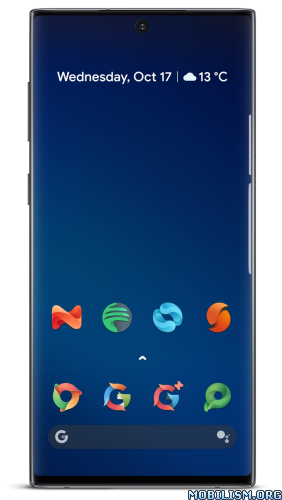
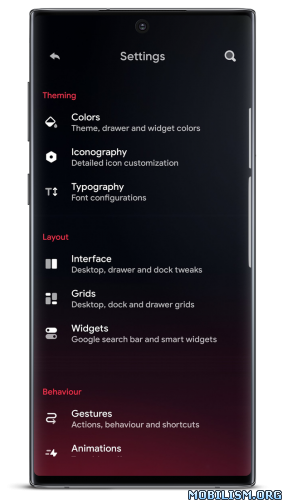
A launcher is not just a home, it needs to be an experience.
Support Chat: t.me/HyperionHub
Hyperion Dock (Enable Google Feed): prjkt.io/dock
We believe that not only should everyone deserve a sweet, feature-filled launcher with a beautiful UX, we wanted it to always be up to date with the best of what Google has to offer at a consistent pace, as well as consistently pushing new tweaks and customization options that users want…without the bloat!
We streamlined this launcher for ourselves; by bringing the best features we love from many launchers found on the market and creating a unified experience – we can truly call this home. As usual, we have everything that a typical Launcher3 based launcher has, but much more!
Features:
★ Colours:
• Launcher and accent theming: with an intricately designed theme by Manuel Möllmann (Deep Darkness Theme)
• Drawer background; glow adjustments and scrolling indicator colour
• Dock background colour
• Folder background colour
• Search widget colours (Drawer/Dock)
• Smart widget colours
★ Iconography:
• Desktop, Drawer and dock icon changes (Icon size, Label size, Text colour, Text shadows, Multiple lines)
• Adaptive icon shaping
★ Typography:
• Full launcher font change (Pro!)
★ Interface:
• Covers: For folders, you can swipe up to open or mask the folder with a main icon
• Icon packs: View your icon pack changes immediately without quitting activities!
• Hidden apps
• Overview menu items: Adjust what you want when long pressing the home screen
• App launch locking (Launcher level only, will not prevent launch from other places)
• Desktop locking (includes temporary unlocking)
• Scrolling wallpaper
• Status bar and navigation bar icon colouring (Wallpaper/Dark/Light)
• Wallpaper gradient adjustments
• Homescreen wallpaper dimming on dark mode
• Drawer and Dock blur
• Navigation bar display
• Google Feed (Hyperion Dock)
• Remembering app drawer position/Automatically close
• Dock/Page indicator styling
• Dock styling and shadow
• Two row dock
• Automatically hide Icon Pack/Substratum theme dashboards and other dashboards (Pro!)
★ Grids:
• Desktop, Drawer and Dock
★ Widgets:
• Google Search Widget
• Google Smart Widget (Pro!): Does not need a launcher plugin/bypass!
★ Custom Gestures (Pro!):
• One/Two finger double tap, swipe up, swipe down
★ Animations:
• Launcher animation speed
• App launch animation
• Fade on swipe transition
• Bounce physics
★ Profile manager:
• Visual, always shows you a screen of what your set up looks like!
Credits and acknowledgements:
We would like to give thanks to a ton of people who worked and contributed with our development team throughout the whole process!
Manuel Möllmann
Max Patchs
Amir Zaidi
PaphonB
Till Kottmann/David Siedtmann (Lawnchair Team)
Permissions overview:
Query all apps: To show apps installed on your device.
Storage: We use storage only for wallpaper extraction for adaptive colors and backing up and restoring profiles.
Calendar: To show events on your desktop.
Location: For an automatic weather reading on your desktop.
Accessibility: To lock the screen or show the recent apps screen triggered by custom tap or swipe gestures.
Device Administrator: To lock the screen triggered by custom tap or swipe gestures.
What’s New:
Hyperion 2 is here!
With all-new theming system, home transition animation and tons of improvements. This update is the biggest one we’ve ever made!
Read more https://twitter.com/prjkt_io/status/1551634894593626112
Mod Info:
- Plus / Paid features unlocked;
- Disabled / Removed unwanted Permissions + Receivers + Providers + Services;
- Optimized and zipaligned graphics and cleaned resources for fast load;
- Google Play Store install package check disabled;
- Debug code removed;
- Remove default .source tags name of the corresponding java files;
- Analytics / Crashlytics / Firebase disabled;
- Languages: Full Multi Languages;
- CPUs: armeabi-v7a, arm64-v8a, x86, x86_64;
- Screen DPIs: 120dpi, 160dpi, 240dpi, 320dpi, 480dpi, 640dpi;
- Original package signature changed;
- Release by Balatan.
This app has no advertisements
More Info:
https://play.google.com/store/apps/details?id=projekt.launcherDownload Instructions:
https://www.up-4ever.net/4g5il0nf8x4z
Mirrors:
https://modsfire.com/5dLn9OF3off93Ic
https://cloudfam.io/1d40aad18c95
https://upfiles.com/RmNC
https://mega4upload.net/az2vh86t4011
https://katfile.vip/gih21wseq610
https://dailyuploads.net/g2wyeftajaq7.