Requirements: 8.0+
Overview: Create tons of shortcuts.
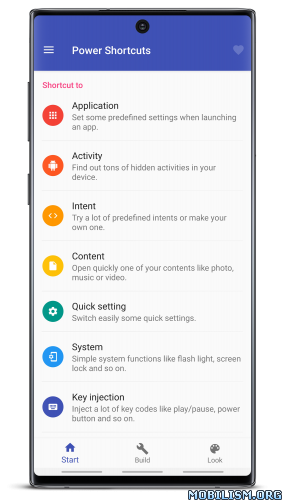
Unlock the full potential of your device by creating powerful custom shortcuts.
Power Shortcuts allows you to create a vast range of shortcuts to streamline your daily tasks:
– Application: Launch apps with automated system settings (volume, brightness, etc.).
– Activity: Discover and launch hidden activities within your installed apps.
– Intent: Use powerful predefined intents or create your own custom ones.
– Media Control: Easily control the media app currently playing.
– Content: Quickly open specific content like photos, music, or videos.
– Website: Create instant access to your favorite web pages.
– Contact: Quick dial, text, or email your favorite contacts.
– Quick Settings: Toggle system settings with a single tap.
– System: Access essential functions like flashlight, screen lock, and more.
– Key Injection: Simulate key presses such as media play/pause, power button, and more.
* This app uses the Accessibility Service API to perform the following system actions:
– Expand Notifications panel
– Expand Quick Settings
– Show Recent apps
– Show Power menu
– Toggle Split screen
– Take Screenshot
– Lock Screen
No personal data is collected or processed through this permission.
—————————————————
IMPORTANT!
Some features of this application use unofficial Android APIs, which means they may not be compatible with all devices or Android versions.
We strive for maximum compatibility, but we cannot guarantee these features will work on every device. Please consider this before rating the app.
—————————————————
What’s New:
– supports many other languages
– “Content” shortcut works well now
– changed build target to Android 16
– added “Direct call” for Contact actions
– added actions to open some system panels for the “System” shortcut
– added the “Open app info” for the “Application” and “Activity” shortcut
– fixed some bugs
Mod Info:
- No root or Lucky Patcher or Google Play Modded required;
- Disabled / Removed unwanted Permissions + Receivers + Providers + Services;
- Optimized and zipaligned graphics and cleaned resources for fast load;
- Google Play Store install package check disabled;
- Debug code removed;
- Remove default .source tags name of the corresponding java files;
- AOSP compatible mode;
- Languages: Full Multi Languages;
- CPUs: universal architecture;
- Screen DPIs: 160dpi, 240dpi, 320dpi, 480dpi, 640dpi;
- Original package signature changed;
- Release by Balatan.
This app has no advertisements
More Info:
https://play.google.com/store/apps/details?id=com.ss.powershortcutsDownload Instructions:
https://cloudfam.io/9b1ad09508ab
Mirrors:
https://modsfire.com/z7T6A0Cuy7DlStl
https://www.up-4ever.net/0fxatpyylx62
https://upfiles.com/2gEf64Q
https://mega4upload.net/sg3duc4mm2mf
https://dailyuploads.net/zcoxfrg8qxmq.