Requirements: 6.0+
Overview: Solid Explorer is a file management app inspired by the old school file commander applications.
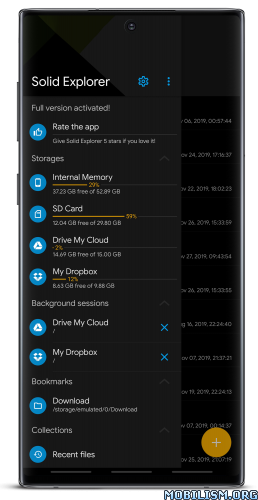
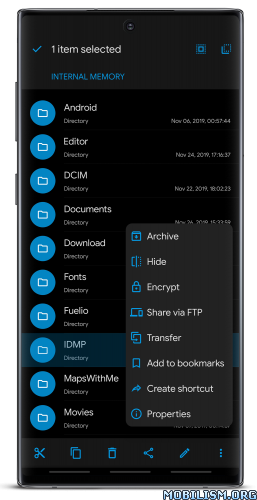
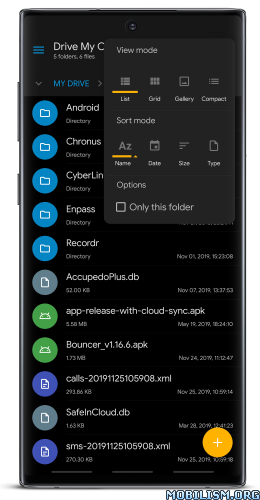
It will help you:
Easily manage files in dual pane layout
Protect files with strong encryption
Manage files on your cloud storage or NAS
Backup apps and files to any desired destination
Explore your device
Solid Explorer lets you navigate to files stored on your device and automatically organizes them into collections. You can view, delete, move, rename or share any files. It also allows you to quickly find the files you need through indexed search with filters.
Keep your files safe
Solid Explorer can protect selected files with strong AES encryption and put them in a secure folder, which contents are unreadable for other apps. The file manager will ask for password or fingerprint confirmation when you browse the folder. Even if you uninstall Solid Explorer, the files stay on your device and are still protected.
Analyze Storage
Although this file manager doesn’t feature a dedicated storage analyzer, you can find out which files take up most of space by going to folder properties of internal storage or SD card. You will find the information about the percentage of space each folder takes and the list of biggest files. You can also use search with a file size filter.
Organize remote files
Solid Explorer supports major network protocols and cloud providers to let you organize multiple remote file locations in one place. You can easily transfer files between cloud locations/servers just by dragging them from one panel to another.
Major feature list:
• Files management – main storage, SD card, USB OTG
• Cloud storage – easily connect and manage files on Google Drive, OneDrive, Dropbox, Box, Owncloud, SugarSync, MediaFire, Yandex, Mega*
• NAS – support for major network protocols FTP, SFTP, SMB (Samba), WebDav
• File encryption – password and fingerprint protection
• Archives – support for ZIP, 7ZIP, RAR and TAR files
• Root explorer – browse system files if your device is rooted
• Indexed search – quickly find files on your device
• Analyze storage – manage files taking too much space on your device
• Organized collections – files categorized in Downloads, Recent,Photos, Videos, Music, Documents and Apps
• Internal image viewer, music player and text editor – for easier browsing on remote storages
• Batch rename – with support for naming patterns
• FTP Server – for accessing your local files from PC
• Themes and icon sets – rich customization options
Solid Explorer will also manage files on your Chromebook with support for mouse and keyboard input.
What’s New:
v3.2.14
– fixed opening archive files from other apps
– fixed FTP TLS session resumption
– crash fixes
Mod Info:
- Full / Paid features unlocked – no additional key required;
- Disabled / Removed unwanted Permissions + Receivers + Providers + Services;
- Optimized and zipaligned graphics and cleaned resources for fast load;
- Ads Permissions / Services / Providers removed from AndroidManifest;
- Ads links removed and invokes methods nullified;
- Ads layouts visibility disabled;
- Google Drive Cloud doesn’t work;
- Google Play Store install package check disabled;
- Debug code removed;
- Startup disabled;
- Remove default .source tags name of the corresponding java files;
- Analytics / Crashlytics / Firebase disabled;
- Work with original plugins;
- No active trackers or advertisements;
- Languages: Full Multi Languages;
- CPUs: armeabi-v7a, arm64-v8a, x86, x86_64;
- Screen DPIs: 160dpi, 240dpi, 320dpi, 480dpi, 640dpi;
- Original package signature changed;
- Release by Balatan.
This app has no advertisements
More Info:
https://play.google.com/store/apps/details?id=pl.solidexplorer2Download Instructions:
All-in-One Universal Mod:
https://modsfire.com/41i98sYvZkD3w17
Mirrors:
https://uploadrar.com/2f7k4hl3zb6t
https://upfiles.com/yRiy5E0
https://mega4upload.net/pbxavznqk72v
https://katfile.online/0o88n6kz61c1
https://frdl.io/bp262uu0k4kc
https://dailyuploads.net/fvkolpy2g4h8
arm64-v8a:
https://modsfire.com/Qgi24Pwdw36boQ5
Mirrors:
https://uploadrar.com/hkcpiddtoovb
https://upfiles.com/J34P
https://mega4upload.net/9q9ppo8hdfzz
https://katfile.online/l9j3r8z5ltqn
https://frdl.io/4j7k2osemzw5
https://dailyuploads.net/bsu2d554aqzj
armeabi-v7a:
https://modsfire.com/rlhWo4ur12Kf9a4
Mirrors:
https://uploadrar.com/vwcjl0ktyll7
https://upfiles.com/NJRdQj7V
https://mega4upload.net/7aj5sg8qiprd
https://katfile.online/fbe7ecpf8u0e
https://frdl.io/ucf8xkqeh9gq
https://dailyuploads.net/c2zmix1morm1
x86:
https://modsfire.com/RcK269AOWvgBZRa
Mirrors:
https://uploadrar.com/i6tohw141zhd
https://upfiles.com/2p7B
https://mega4upload.net/sxuua6551a7k
https://katfile.online/c6o4oj0qrfrq
https://frdl.io/40f7smay6vd6
https://dailyuploads.net/wtbubfd4g76v
x86_x64:
https://modsfire.com/1eh3ObN8NHh66OJ
Mirrors:
https://uploadrar.com/5a2r9969fjoz
https://upfiles.com/AyhyR6k
https://mega4upload.net/2sde4o8y663i
https://katfile.online/t9vpreh0jdq3
https://frdl.io/t9lqvex4srhk
https://dailyuploads.net/3o72fci6yoye
Plugins for Solid Explorer: USB OTG Plugin v1.0.6 | FTP Server v1.2.5 | MEGA v1.1.8 [armeabi-v7a] [arm64-v8a] [x86] [x86-x64] | Cast v1.0 | Amazon Cloud Drive & S3 v1.0.2
https://frdl.io/liy9gzw2i4ep
Mirrors:
https://modsfire.com/U43f89vz44KNV09
https://upfiles.com/SGcEnIw
https://mega4upload.net/1vwwef25l9p8
https://katfile.online/vuhqwhuedotm
https://dailyuploads.net/uuipadbnqban
https://uploady.io/ehkgwatdeccy
Icons Pack for Solid Explorer: Unfolded Icons v1.1 | Paper Icons v1.1 | Shadow Icons v1.1
https://mega4upload.com/wikd4wd9e37m
Mirrors:
https://dailyuploads.net/fd70ltvt2izh
https://katfile.cloud/5di8i9sgvhl2.